The HC-SR04 shouts and listens for the echo. It is the cheapest way to measure distance without touching anything, which is why it ends up in obstacle-avoiding robots, water-tank level meters, parking sensors and blind sticks — four of the most common final-year projects there are.
It is also the sensor that most often gets used past what it can actually do, so it is worth understanding what it measures before you build a project that depends on it.
How it works
The two metal cylinders are a speaker and a microphone, both tuned to 40 kHz — far above hearing. Give the TRIG pin a 10 microsecond pulse and the speaker emits eight clicks. The ECHO pin then goes high, and stays high until the microphone hears them come back.
So the width of the ECHO pulse is the time of flight. Everything else is arithmetic.
distance = (duration / 2) x 0.0343
- duration in microseconds, from
pulseIn() - 0.0343 cm per microsecond — the speed of sound, 343 m/s
- Halved because the sound went there and came back
What you need
- An Arduino Uno, Nano or Mega
- An HC-SR04 module
- Four jumper wires — VCC, TRIG, ECHO, GND
Wiring
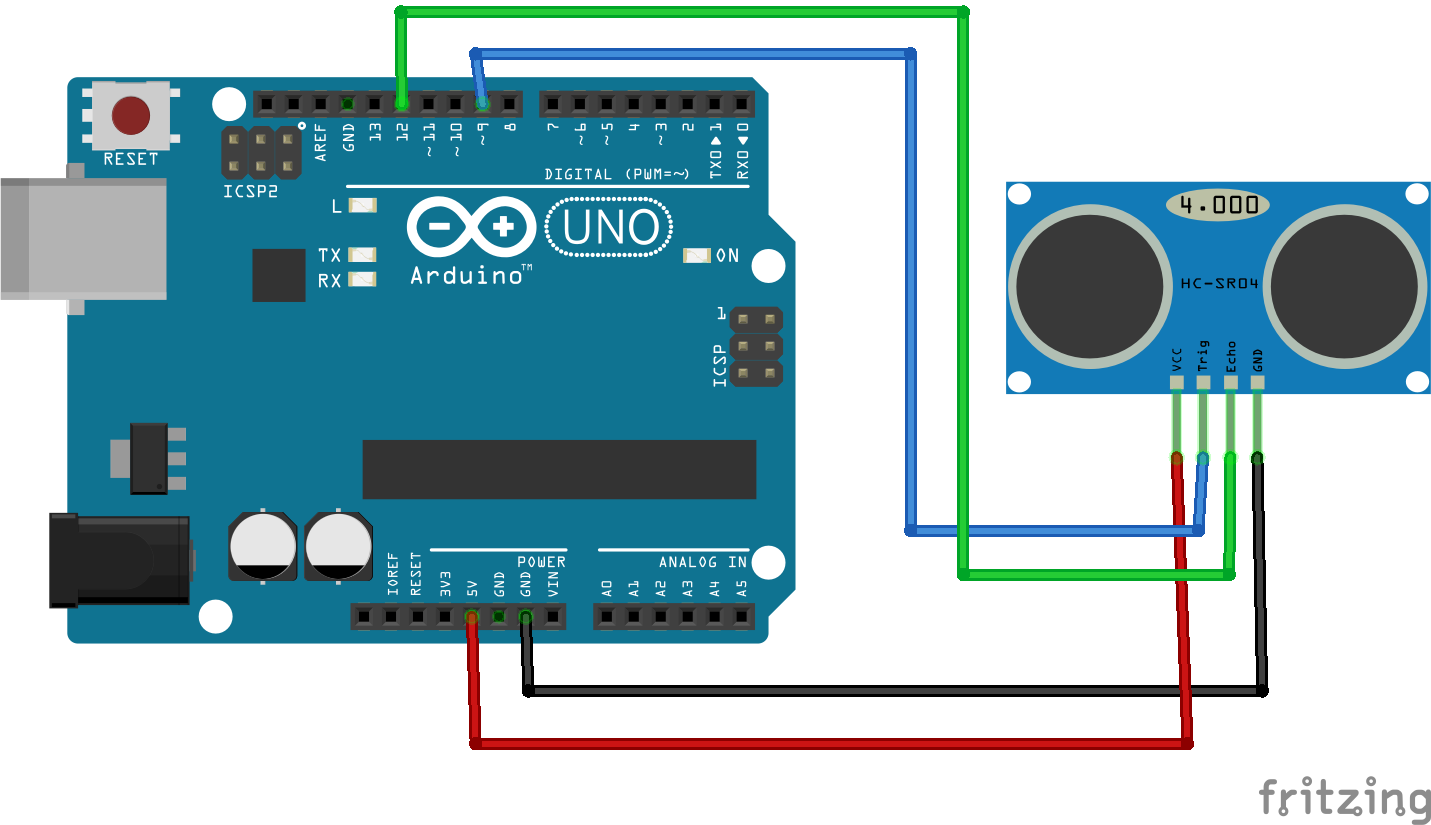
| Module pin | Arduino | Direction |
|---|---|---|
| VCC | 5V | Power in |
| TRIG | Pin 11 | Arduino talks to the sensor |
| ECHO | Pin 12 | Sensor answers |
| GND | GND |
The sketch
const int trigPin = 11;
const int echoPin = 12;

void setup() {
  Serial.begin(9600);
  pinMode(trigPin, OUTPUT);
  pinMode(echoPin, INPUT);
}

void loop() {
  // A clean 10 microsecond pulse on TRIG sends a burst of eight 40 kHz clicks.
  // The short LOW first makes sure the pulse starts from a settled line.
  digitalWrite(trigPin, LOW);
  delayMicroseconds(5);
  digitalWrite(trigPin, HIGH);
  delayMicroseconds(10);
  digitalWrite(trigPin, LOW);

  // ECHO goes high when the burst leaves and low when it comes back, so its
  // width IS the round trip. The 30000 is a timeout: without it, a missing
  // echo blocks here for a full second and the whole sketch stutters.
  long duration = pulseIn(echoPin, HIGH, 30000);

  if (duration == 0) {
    Serial.println("No echo - out of range, or the surface is too soft");
  } else {
    // Sound covers about 1 cm every 29.1 microseconds. The pulse measured the
    // trip out AND back, so halve it: 2 x 29.1 = 58.2.
    float cm = duration / 58.2;
    Serial.print(cm, 1);
    Serial.println(" cm");
  }

  delay(250);
}What it cannot see
This is the part that decides whether your project works in the demonstration, and it is almost never in the datasheet summary.
- Soft things. Cloth, foam, curtains and jumpers absorb 40 kHz instead of reflecting it. A person in a woollen sweater can be nearly invisible.
- Angled surfaces. Past roughly 15 degrees off square, the echo bounces away from the microphone rather than back to it. A wall approached at an angle simply disappears.
- Small things. The beam is about 15 degrees wide, so at 2 m it is looking at a circle 50 cm across. A cable or a chair leg does not return enough.
- Anything closer than 2 cm. The module is still transmitting when the echo arrives and cannot hear it.
- Two sensors facing each other. They hear each other's bursts. Trigger them alternately, never together.
When it does not work
| What you see | Cause | Fix |
|---|---|---|
| Always 0 cm | TRIG and ECHO swapped | Swap the two wires. |
No echo always | No 5 V, or GND not shared | Check VCC is on 5V, not 3.3V. Check the ground. |
| Readings jump about wildly | Loose breadboard contact, or reflections | Reseat the module. Take the median of three. |
| Distance always about 2 cm | Something is right in front of it | Also happens when the module is face-down on the bench. |
| Works on the bench, fails on the robot | Motor current dipping the supply | Give the motors their own battery, grounds joined. |
Where to take it
- Add a buzzer whose beep gets faster as distance falls, and it is a blind stick or a parking sensor.
- Point it down into a tank and it is a water-level meter — measure to the surface, subtract from the tank height.
- Put two on the front of a chassis and it is obstacle avoidance.
- Add a servo underneath and sweep it, plotting distance against angle, and it is a radar display.